Using FiberFactory
The FiberFactory is a convenient class
that allows us to build a Fiber, or a
family of fibers. A FiberFactory defines a list of layers. Each fiber built
from a FiberFactory share the same structure of layers. Layers are defined
from the center of the fiber (layer 0) to the exterior. Each layer have
a specific geometry and material.
Geometry and material
The geometry describes the relation between the refractive index of the layer,
and the radial position. Actually, the only choice is
StepIndex, which means the
refractive index is uniform across the fiber layer. In the future, it could
be possible to define other geometries, to define graded index fibers, for
instance.
The material describes the relation between the refractive index of the
layer, and the wavelength of the light. The simplest material is
Fixed, which means that the
refractive index is independent of the wavelength. Some materials, like
Air or
Silica only have dependency on the
wavelength. Other materials, like
SiO2GeO2 or
SiO2F also depend on the
concentration of a dopant.
Defining fiber layers
The first step is to create a new empty FiberFactory object:
from fibermodes import FiberFactory
factory = FiberFactory()
If we want, we can add some metadata to the fiber factory. This is especially useful when we save a fiber design in a file, and we want to remember later what was that fiber. Metadata are accessible as properties:
factory.name = "Name of your fiber"
factory.author = "Your Name"
factory.description = "Description of your fiber"
You can also get the creation date and time, and when the fiber was last saved to a file:
crdate = factory.crdate
tstamp = factory.tstamp
The addLayer() method
is used to create layers. With no arguments, it creates a StepIndex Fixed
layer, at outer position, with refractive index of 1.444:
factory.addLayer()
Parameters can be given to specify position, name, geometry, and material. For example, to create a step-index layer named “core”, of 4 µm radius, with Silica doped with 10% of Germania:
factory.addLayer(pos=0, name="core", geometry="StepIndex", radius=4e-6,
                 material="SiO2GeO2", x=0.1)
It is also possible to specify index and wavelength, and the material will compute the right concentration:
factory.addLayer(pos=1, name="trench", radius=6e-6, material="SiO2F",
                 index=1.441, wl=1550e-9)
Getting information form layers in FiberFactory
Is is possible to get informations about the layers in an already created
FiberFatory, using the layers()
property. For example:
print(factory.layers[0].name)
print(factory.layers[1].radius)
factory.layers[2].name = "cladding"
Creating families of fibers
All fiber parameters can be specified either as a scalar value, a list, a range, or as code to be executed. We already covered the assignation of scalar values in previous examples.
Specifying parameters as list
Suppose we want to simulate fibers with varying core radius. We can build the FiberFactory like this:
factory = FiberFactory()
factory.addLayer(name="core", radius=[1e-6, 2e-6, 3e-6, 4e-6, 5e-6],
                 index=1.474)
factory.addLayer()
We could now compute the effective index of the HE(1,1) mode, for each fiber:
for i, fiber in enumerate(factory):
    print(factory.layers[0].radius[i], fiber.neff(Mode("HE", 1, 1), 1550e-9))
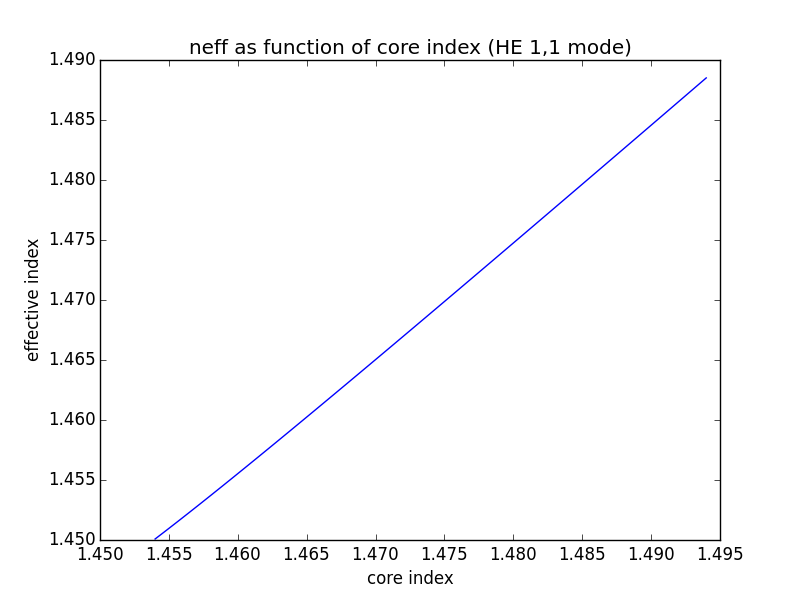
Suppose now we want to plot effective index as function of core index:
from matplotlib import pyplot
import numpy

n = numpy.linspace(1.454, 1.494)
factory = FiberFactory()
factory.addLayer(name="core", radius=4e-6, index=n)
factory.addLayer(name="cladding")

neff = numpy.zeros(n.shape)
for i, fiber in enumerate(factory):
    neff[i] = fiber.neff(Mode("HE", 1, 1), 1550e-9)


pyplot.plot(n, neff)
pyplot.show()
Generating the fibers
In the previous example, we generated the fibers by iterating over the factory object. For example, to generate all fibers in a list, we can do:
fibers = list(factory)
We can also access fibers by index. For example, to get the fifth fiber:
fiber = factory[4]
If multiple parameters are specified as list, the product of parameter combinations is generated. For example, if there are two core radii, and three core indexes, there will be six different fibers generated. The number of generated fibers can be queried using the len function.
Specifying parameters as range
Another way to specify parameters is to specify a range. The range itself is defined using a dict, with start, end, and num keys. If many parameters contain multiple values, fibers with all combination of parameters are built. For example:
factory = FiberFactory()
factory.addLayer(name="core", radius={'start': 2e-6, 'end': 5e-6, 'num': 10},
                 index=[1.454, 1.464, 1.474])
factory.addLayer(name="cladding")
print(len(factory))
would print 30, because there are 10 radius combined with 3 indexes.
When the FiberFactory build fibers, it removes unneeded layers. For example if two consecutive layer have the same refractive index, or if the layer radius is 0. Therefore, the resulting fiber could have a smaller number of layer that the number of layers in the FiberFactory itself.
Specifying parameters as code
The last way to specify parameter is to write Python code. This is the only way to make a parameter depend on another parameter. The function is defined like this:
def f(r, fp, mp):
    # You code goes here
It is expected to return a single value. The simplest possible code would be something like this:
factory = FiberFactory()
factory.addLayer(radius="return 4e-6", index="return 1.474")
factory.addLayer()
Off course, this example is useless, as you should directly pass the value.
The three parameters you receive are the layer parameters. r is a list that contain the radius of each layer, e.g. r[0] is the radius of the center layer, and so on. fp, for fiber parameters, is a list containing the list of geometry parameters for each layer. For StepIndex geometry, it is unused. mp, for material parameters, is a list containing the list of material parameters. Actually, it is only useful for doped material, like SiO2GeO2. For example, if the second layer is SiO2GeO2, its molar concentration is given by mp[1][0].
Code is executed from center layer to the exterior. Therefore, it is possible to refer a value from an computer inner layer, but not from a computer outer layer.
Suppose you want to define a family of ring-core fibers, where the ring is 2 µm thick. You could do it like this:
factory = FiberFactory()
factory.addLayer(radius={'start': 1e-6, 'end': 10e-6, 'num': 10})
factory.addLayer(radius="return r[0] + 2e-6", index=1.474)
factory.addLayer()
Now, if you want to define a family of fibers sharing different core radius, but the same V number (V=10):
code = """V = 10
ncl = 1.444
k0 = 2 * math.pi / 1550e-9
n = math.sqrt((V / (k0 * r[0]))**2 - ncl**2)
return n
"""
factory = FiberFactory()
factory.addLayer(radius={'start': 1e-6, 'end': 10e-6, 'num': 10},
                 index=code)
factory.addLayer(index=1.444)
Loading and saving factory objects
FiberFactory has an interface similar to json.
You can load and save the factory to a json file, or to a json string,
using load(),
dump(),
loads(), or
dumps() methods:
with open('myfiber.json', 'w') as f:
    factory.dump(f)

with open('myfiber.json', 'r') as f:
    factory.load(f)
You can also give the file name to the FiberFactory constructor:
factory = FiberFactory('myfiber.json')
When you save the factory to a file, the timestamp is update automatically. Therefore, you always know when the object was last modified.